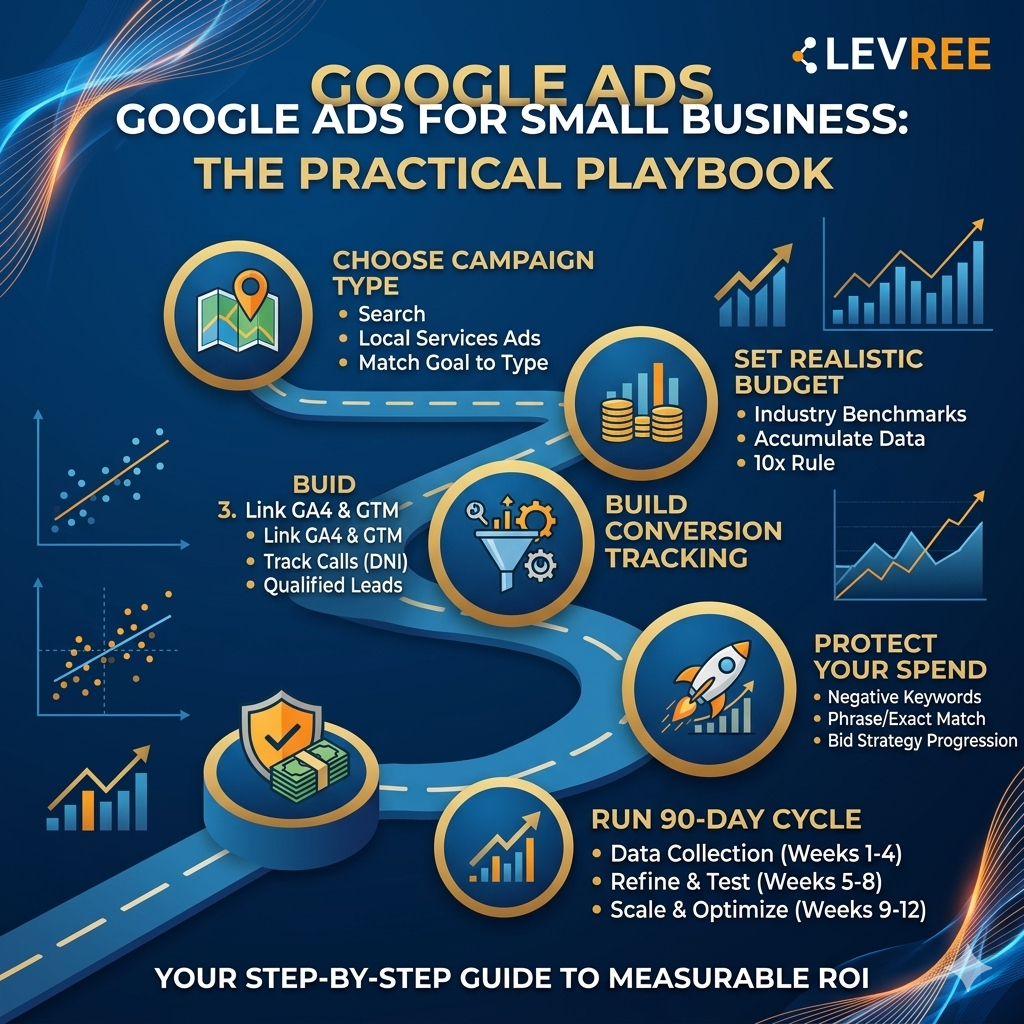
Discover the ultimate Google Ads for small business playbook designed to help you generate more leads, improve ROI, and avoid costly advertising mistakes. Learn how to choose the right campaign type, set realistic budgets, build accurate conversion tracking, optimize bidding strategies, and scale your campaigns with confidence. Whether you're a local service business, ecommerce brand, or startup,
Google Ads for Small Business: The Practical Playbook
Most small business owners approach Google Ads for small business the same way: set a budget, pick some keywords, let it run for a month, then conclude it doesn't work. The spend disappears, the leads don't materialize, and the platform gets blamed. The platform isn't the problem. The setup is. At Levree, we've audited and rebuilt hundreds of small business Google Ads accounts, and the same avoidable mistakes show up every time: the wrong campaign type for the goal, no conversion tracking, and Smart Bidding switched on before there's any data to optimize against.
This playbook covers the exact decisions that separate campaigns generating real ROI from ones that just generate invoices. You'll get a clear framework for choosing the right campaign type, setting a budget grounded in real industry benchmarks, building your conversion tracking stack, and running a disciplined 90-day optimization cycle. Whether you're starting from scratch or trying to salvage a campaign that's bleeding spend, this is the process that works.
Google Ads for Small Business: Choosing the Right Campaign Type Before You Spend a Dollar
Google's setup wizard will almost always push you toward a Smart campaign or Performance Max. Neither is inherently wrong, but accepting the default without thinking through your specific goal is how you hand Google your budget without a clear destination. The decision should start with one question: what action do you actually want a customer to take?
Search campaigns are the right starting point for most small businesses. They target users actively typing queries into Google, which means high intent and precise keyword control. If someone searches "emergency HVAC repair near me," a well-structured Search campaign puts your ad in front of them at exactly the right moment. Performance Max runs across all Google channels simultaneously, using AI to optimize toward conversions. It works well for businesses that want broad reach without managing individual placements, but it requires solid conversion data and enough budget to generate meaningful signals. Without those inputs, the algorithm is guessing.
Smart campaigns are the most automated option and genuinely appropriate for owners who have no time for campaign management. You set your goal, location, and budget; Google handles the rest. Local Services Ads operate differently from all of the above, you pay per lead, not per click, and you only appear for service-category searches in your area. For plumbers, HVAC contractors, healthcare clinics, and similar service businesses, LSAs often deliver the lowest cost-per-lead. The 2026 benchmark for home services LSAs sits around $53 per lead, compared to $90+ for standard Search campaigns in the same vertical.
The practical decision logic breaks down like this:
- A local service business with a limited budget should start with Search or LSAs for control and accountability.
- An e-commerce brand with a product catalog and some historical data can move into Performance Max.
- A solo operator who wants visibility without managing campaign details starts with Smart campaigns, accepting less control in exchange for less complexity.
Setting a Realistic Budget for Google Ads, By Industry
The most common mistake beyond wrong campaign type is underfunding a campaign relative to the market. A $500/month budget in a legal services market where the average CPC exceeds $10 generates so few clicks that you'll never accumulate enough conversion data to optimize. The result feels like failure, but it's actually just insufficient statistical sample size.
Here's what realistic monthly budgets look like by vertical, based on WordStream and Google's 2026 benchmark data:
Legal and insurance:
$5,000 to $6,500+ to be competitive
Home services and healthcare:
$3,000 to $3,500 minimum
Real estate and financial services:
$3,800 to $4,600+
E-commerce and beauty:
$2,000 to $8,000 depending on niche competitiveness
Restaurants and travel:
$1,000 to $3,000 can generate meaningful data
These aren't guarantees of results. They're minimums for accumulating enough data to make optimization decisions. If your vertical isn't listed, use the 10x rule as your starting point: if your target cost-per-lead is $50, your initial monthly budget should be at least $500. That generates roughly 10 potential conversions, enough to identify patterns even if not yet enough to unlock Smart Bidding.
One more factor to account for: the learning phase. New campaigns typically spend one to two weeks in a calibration period where the algorithm is establishing baselines. For home services with a strong landing page, expect your first conversion within 7 to 14 days. For professional services with longer sales cycles, 4 to 8 weeks is more realistic. Set expectations accordingly, especially with clients or internal stakeholders who expect immediate ROI.
Building Your Conversion Tracking Foundation
Skipping conversion tracking doesn't just mean you can't measure results. It means your bidding algorithm is optimizing toward nothing, and every dollar spent is guesswork. This is the single most common reason small business campaigns stagnate. The setup isn't technically complex, but it requires doing things in the right order.
Start by linking your GA4 property to your Google Ads account. In GA4 Admin, navigate to Product Links and connect your Google Ads account. This establishes attribution and enables audience sharing between the two platforms. For the actual tracking implementation, Google Tag Manager is the recommended path for small businesses without dedicated developer resources. Install the GTM container on your site, create a GA4 Configuration tag with your Measurement ID, and set it to fire on all pages.
Phone calls are the primary conversion for most local service businesses, and they're also the most commonly missed. Dynamic number insertion (DNI) through a service like CallRail or 800.com swaps your displayed phone number based on traffic source, so you know exactly which ad drove each call. In GTM, create a trigger that fires when someone clicks a link, add a 30-second minimum time filter to qualify the call, and push that as a GA4 event. Mark that event as a conversion in GA4, and it flows back into Google Ads automatically.
Not every action on your site deserves conversion status. Homepage visits, PDF downloads, and social icon clicks don't indicate purchase intent. For most service businesses, qualifying conversions means calls lasting over 60 seconds, form submissions that match your service area, and confirmed appointments. Training your bidding algorithm on junk conversion signals produces junk results. Be ruthless about what counts.
Targeting and Bidding Strategies That Protect a Limited Budget
With conversion tracking in place, the next layer is controlling where your ads show and how much you bid. For small budgets, both decisions directly determine how quickly you run out of spend and how qualified the traffic is when you get there.
Start with phrase match and exact match keywords rather than broad match. Broad match without a strong negative keyword list will serve your ads against queries that have nothing to do with your business. Before the campaign goes live, build your negative keyword list. Universal additions for service businesses include: "job," "jobs," "career," "hiring," "salary," "free," "DIY," "how to," "tutorial," "cheap," and any location modifiers outside your service area. If you don't offer emergency or same-day service, add those as negatives too. A pre-launch list of 50 to 100 negatives is not excessive; it's standard practice.
New campaigns with no conversion history should start on Maximize Clicks or Enhanced CPC. This generates data without forcing the algorithm to optimize toward a target it can't hit yet. The threshold for switching to Target CPA is a minimum of 15 conversions in the past 30 days within that campaign, though 30 conversions is the more reliable benchmark for stable performance.
Setting your initial Target CPA at 5 to 10% above your current average CPA gives the algorithm room to operate without immediately triggering budget instability. Target ROAS makes sense for e-commerce once you have sufficient revenue data. Skipping this progression and jumping straight to Smart Bidding on a brand-new account is one of the most predictable ways to stall a campaign in its first month.
Running Your First 90-Day Google Ads Optimization Cycle
The first 90 days of a Google Ads campaign are a data collection and refinement period. Treating it like an instant revenue machine leads to premature changes, algorithm resets, and campaigns that never find their footing. The discipline required is mostly the discipline of not touching things prematurely.
In weeks one through four, resist the urge to make major changes. The campaign is in its learning phase, and significant edits to budgets or bids reset that phase entirely. Monitor daily for operational problems: disapproved ads, budgets depleted before noon, and obviously irrelevant search terms showing up in your Search Terms Report. Add those irrelevant terms to your negative keyword list, that's an appropriate action during this window. Restructuring ad groups, changing bids, or adjusting targeting is not.
In month two, pull your Search Terms Report and work through it systematically. Pause keywords with meaningful spend and zero conversions. Increase bids on keywords converting below your target CPA. Review your ad copy CTR across headlines; anything sitting below 2% with enough impressions to be statistically meaningful is worth pausing and replacing. Test new headline variations against your current control, one change at a time, tracked by date.
By month three, you should have enough signal to identify your top-converting keywords, strongest ad copy combinations, and time-of-day patterns. Shift budget allocation toward what's working. If certain hours or days show a consistently lower CPA, introduce bid schedule adjustments. Consider opening a second ad group around a related service or secondary product. This is also the point where transitioning to Target CPA bidding becomes appropriate if you've hit the conversion threshold. The campaigns that stall at month three are almost always the ones that skipped the month one and month two groundwork.
When to Manage Google Ads Yourself vs. Working with an Agency
DIY Google Ads is absolutely viable for small businesses, and this playbook gives you the structure to do it properly. But there's a point where the time investment and expertise gap start costing more in wasted spend than a management fee would. Recognizing that point early saves real money.
Watch for these specific signals: you've been running ads for 60 days and can't identify which keywords are generating leads; your cost-per-conversion is trending upward month over month despite adding negatives; you're spending more than $2,000 per month without a clear attribution model connecting ad spend to revenue. Any of these means the campaign needs structural intervention, not just more budget.
At Levree, we work specifically with small businesses on Google Ads campaigns, handling everything from initial account structure and conversion tracking setup to ongoing bid management and monthly performance reporting. The focus is always on measurable ROI, not impressions or click volume. For businesses that don't want to spend three months climbing the learning curve while paying tuition with their ad budget, a managed approach means campaigns are built correctly from day one, and every dollar you spend stays traceable back to a result.
The Foundation Comes First
Google Ads for small business works when the fundamentals are right. Campaign type, budget, conversion tracking, bidding progression, and consistent optimization aren't independent decisions. These elements form a connected system, and a weak link in any one of them degrades the whole campaign. The businesses that conclude Google Ads doesn't work for them are almost always the ones that skipped a step in this sequence.
Start with what you've covered here: match your campaign type to your actual business goal, set a budget grounded in your industry's CPC reality, track every conversion that matters, and run the 90-day cycle with patience and discipline. Google Ads for small business rewards the operators who do this work, and punishes the ones who skip it. If you hit a wall or want to skip the trial-and-error phase entirely, working with a dedicated Google Ads management team like Levree is worth the conversation.
Leave a comment
Your email address will not be published. Required fields are marked *